What is Oxygen Microscope and who benefits from it
What is new ?
Release Notes and Documentation
Versions history
The Gallery

Test CPU performance of the Pacor, Helium Rough and Oxygen Software
 
Oxygen Microscope Server download
 
Oxygen Microscope Documentation (PDF)
FAQ
Customizing Oxygen Customer Reports
Customizing Oxygen / DiamCalc Polish reports

Creating and customizing appraisers (PDF)
Creating and customizing pricelists (PDF)
Appendixes
 
DiamCalc
DiBox
DiBox 2.0
GemAdviser Free Version
Helium IG
Helium Polish
Helium Rough
Helium Tender
M-Box 2.0
M-Box 1.5
M-Box
Oxygen DZ
Oxygen HIG
Oxygen Immersion
Oxygen Inclusion
Oxygen Microscope Server
Oxygen Viewer Free Version
Oxygen XRay Server
Pacor
Pacor Client
Stereo Viewer Free Version
ViBox

PACOR - Advanced Computer technologies for Processing of Rough diamonds
Laser Mapping of Concavities
Scanning major and minor symmetry features
Technology patent "A method and apparatus for locating inclusions in a diamond stone"
Immersion Glass
 
Documentation: Oxygen Microscope Workspace
Movement panel

The Movement panel allows precisely set distance, angle and zoom steps for any object on the scene.

To open panel select from menu View / Movement
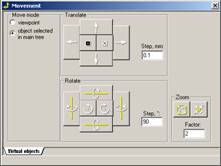
To move objects:

  • Select Move mode:
    • Viewpoint
    • Object selected in main tree panel
  • Move objects with button in Translate section
  • Rotate objects with button in Rotate section

Oxygen Microscope workspace







