|
There are different styles of object visualization:
- Wire-frame (lines)
- Solid
- Transparent
- Refracted (for inclusions).
The visualization scheme is changed automatically when you switch the working mode. However, it is possible to adjust visualization style for one or all scenes according to your momentary needs:
- Click Tea-pot button
 to adjust visualization mode to adjust visualization mode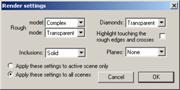
- Select the desired visualization styles for objects in the Render settings panel
- Optionally select Apply these settings to active scene only or Apply these settings to all scenes
- Press OK
Oxygen Microscope workspace
| 














